Observe in your browser
Get a live health check from the dashboard built into your Hew program.
Start the profiler and open its URL
Install Hew v0.9.3, build a program, then enable a TCP profiler:
hew build my_program.hew -o my_program
HEW_OBSERVE=hot HEW_PPROF=127.0.0.1:6060 ./my_program
# Open http://127.0.0.1:6060/ in your browser.
The running program serves the dashboard; no separate Observe app is needed. Leave it running while inspecting. A Unix-socket-only profile from --profile cannot be opened by a normal browser, so use a TCP address for this interface.
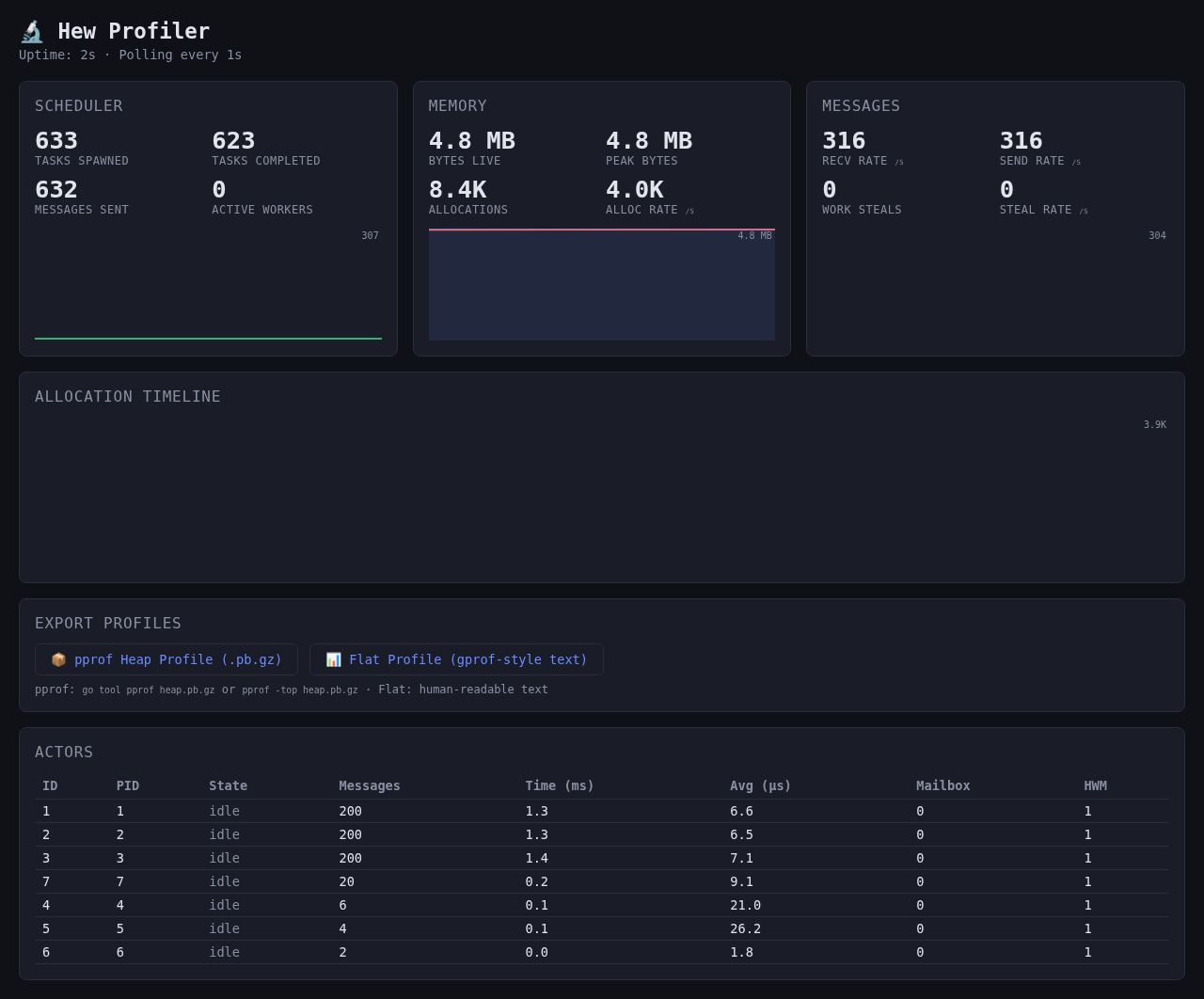
Read the panels
- Scheduler: tasks spawned/completed, sent messages and active workers.
- Memory: current and peak bytes, allocation count and allocation rate.
- Messages: send/receive rates and work-steal activity.
- Allocation Timeline: allocation activity over the retained history.
- Actors: compare message counts, processing time, mailbox depth and high-water marks.
Panels refresh about once a second. Wait a few samples for charts and rates to fill. A cumulative count can stay high while a rate drops to zero; check both when deciding whether work is progressing.
Export a profile
Choose pprof Heap Profile to download heap.pb.gz, or Flat Profile to open a text report. You can also fetch the heap file directly:
curl --fail http://127.0.0.1:6060/debug/pprof/heap -o heap.pb.gz
# Optional: requires Go and its pprof tooling.
go tool pprof -http=127.0.0.1:8080 heap.pb.gz
The heap file uses allocator counters for runtime totals; per-actor rows are estimates derived from processed messages and mailbox high-water marks, rather than measured allocation stacks. It is different from an app's .hewobs session and from a CPU-sampling recording. Use the app's recording workflow to retain metrics and actor events for offline replay.
Connect safely from another device
Bind to your computer's specific LAN address, then open that address from a device on the same trusted network. A remote device's localhost refers to itself. Profiler endpoints expose runtime details without login; keep them off public networks and prefer an SSH-forwarded local port for remote work.
When values stop updating
Confirm the program is still alive, the browser address has the correct port, and /api/metrics returns a response. A quiet program can have flat charts. Restart a finished showcase to begin another session.
For supervision, crash and event inspection, use the terminal observer or desktop app. See the browser manual chapter and profiler API reference.